Chibatix App
Be the first to reviewOn this page
Reviewed by
Ludis.app Team
Published
Apr 17, 2026
Updated
Apr 17, 2026
Chibatix is an interval training app for fitness enthusiasts who prefer to build their own workouts rather than follow pre-scripted routines. It covers six workout formats — Tabata, EMOM, AMRAP, For Time, Every N Minutes, and fully custom — and pairs a purpose-built timer with session logging, streak tracking, and a ten-article science library. The interface runs dark and bold, with a gaming-inspired visual style that makes the whole experience feel more like a competition than a chore.
Inside the App
How It Works
At its core, Chibatix is a workout constructor. You pick a format, select exercises from a library of over 100 movements, dial in work and rest intervals, add a warmup and cooldown, and optionally build supersets or pyramids. Templates for Tabata, EMOM, and AMRAP are available if you want a starting point, but the app is clearly designed for people who want to own every parameter of their training.
The Timer and What It Shows You
The active workout screen is a full-screen pulsing circle that changes colour with each phase: red for work, green for rest, and yellow to prepare. Haptic feedback fires on every transition and the screen stays on throughout. It's a deliberately minimal display — the only information on screen is time remaining, which is exactly what you need mid-set.
Tracking and Progress
- Every session is logged with duration, rounds, work time, and rest time
- The Progress tab shows weekly volume in minutes, an activity heatmap, and a breakdown of sessions by format
- Personal records are tracked per workout, with your first completion flagged as a baseline
- Streak tracking and achievements reward consistency and reward exploring new formats
- The exercise library includes muscle diagrams and technique notes alongside each movement
Learning Center
Ten articles cover the physiology behind HIIT — including EPOC, work-to-rest ratios, recovery, and progressive overload. They're presented inside a dedicated Learn tab with read-time estimates and a progress indicator, so the educational side of the app is treated as a structured track, not a glossary afterthought.
The analytics dashboard is genuinely useful — colour-coded bars for weekly volume, a per-format session count, and a scrollable history — but the heavy reliance on visual charts means users who rely on screen readers may find the data less accessible than the rest of the interface.
A Visual Language Worth Noting
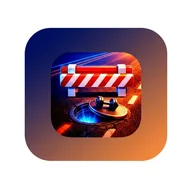
The app icon drops you onto an asphalt road lit by speed lines and light streaks, dumbbells glowing on a futuristic platform in the center of the lane. Inside, the dashboard carries that same kinetic energy — dark navy backgrounds, electric gradients shifting from blue to orange-red, and bold all-caps labels that feel closer to a race HUD than a wellness tracker. If you've spent time with fast-paced games built around momentum, phase changes, and beat-your-last-run feedback loops, Chibatix will feel immediately familiar: every session is a run, every personal record is a lap time, and the colour-coded timer is your finish line.
App Technical Details
| Supported Workout Formats | Tabata, EMOM, AMRAP, For Time, Every N Minutes, Custom |
| Exercise Library Size | 100+ movements with muscle diagrams and technique notes |
| Workout Builder Options | Work/rest periods, warmup, cooldown, supersets, pyramids |
| Timer Visual Feedback | Full-screen pulsing circle: red (work), green (rest), yellow (prepare) |
| Haptic Feedback | On every phase transition; screen stays on during session |
| Progress Analytics | Weekly volume chart, activity heatmap, format breakdown, personal records |
| Gamification Features | Streak tracking, achievements, personal bests |
| Educational Content | 10 articles covering HIIT physiology, EPOC, work-to-rest ratios, recovery, progressive overload |
About Chibatix
What workout formats does Chibatix support?
How does the timer work during a session?
How many exercises are in the library and what details do they include?
What progress data does the app log and display?
What educational content is available in the Learn section?
Reviews
Log in to write a review